npu-exporter使用指南
npu-exporter概述
npu-exporter用于获取NPU设备的指标数据或者相关信息并推送给Prometheus,例如NPU设备ID、NPU利用率、内存使用量等。方便您进一步图形化监控资源使用情况,以及根据AI应用的要求设置告警规则,实现指标数据异常时自动告警。
-
npu-exporter支持推送的NPU指标如下表所示。
指标名称 指标类型 单位 说明 npu_temp Gauge ℃ 设备的当前NPU温度读数。 npu_util Gauge % NPU利用率。 power_draw Gauge W 设备的功耗使用情况。 power_total Gauge W 设备所能达到的总功耗。 memory_used Gauge MB 设备已使用的内存。 memory_total Gauge GB 设备的总内存。 cluster_count Gauge 个 设备内NPC Cluster的数量。 cluster_util Gauge % 设备内每个NPC Cluster的使用率。 cluster_memory_used Gauge MB 设备内每个NPC Cluster已使用的内存。 cluster_memory_total Gauge GB 设备内每个NPC Cluster的总内存。 -
npu-exporter支持获取的NPU设备相关信息如下表所示。
信息类型 指标类型 说明 npu_info Gauge 设备相关的信息,包括服务器IP、设备ID、设备名称、板卡类型、设备SN、驱动版本、设备频率、PCIe总线ID、MCU firmware版本、NPU_ctrl firmware版本。 cluster_info Gauge 设备内每个NPC Cluster相关的信息, 包括服务器IP、NPC Cluster所属设备的ID、NPC Cluster ID、NPC Cluster状态。
安装步骤
-
将npu-exporter安装包解压缩到指定目录。
$ mkdir /usr/local/smi-monitor && tar xf npu-exporter.tar.gz -C /usr/local/smi-monitor -
进入安装目录,安装Prometheus的Python库。请确保已安装Python 3.8或以上版本。
$ cd /usr/local/smi-monitor/npu-exporter
$ pip3 install prometheus_client-0.20.0-py3-none-any.whl -
按需修改服务配置文件。
-
如果通过Conda安装Python:修改服务配置文件中的路径以匹配当前Python环境。请将命令中的
{conda_path}替换为Conda当前Python环境的路径,注意路径中的"/"需要用""转义。例如,如果当前Python环境的路径为/root/miniconda3/envs/app/bin/python,则需要写为\/root\/miniconda3\/envs\/app\/bin\/python。$ sed -i 's/python3/{conda_path}/g' npu_exporter.service说明:为确保服务配置文件的路径修改正确,可查看
npu_exporter.service服务配置文件中ExecStart字段,确认路径是否修改正确,是否有异常字符等问题。 -
如果不是通过Conda安装Python:跳过此步骤,无需修改服务配置文件。
-
-
将服务配置文件复制到指定系统目录。
$ cp -pi npu_exporter.service /usr/lib/systemd/system/
验证采集NPU指标数据
为了向Prometheus推送NPU指标数据,您需要开启npu-exporter服务并启用9836端口。
-
开启npu-exporter服务,并设定为开机自动启动服务。
$ sudo systemctl daemon-reload
$ sudo systemctl enable npu_exporter.service --now -
确认9836端口已启用。返回9836端口相关的信息则表明端口已启用。
$ ss -ntupl | grep 9836
tcp LISTEN 0 5 0.0.0.0:9836 0.0.0.0:* users:(("python",pid=253431,fd=3)) -
调用npu-exporter接口验证采集NPU指标数据。请将命令中的
{server_ip}替换为安装了npu-exporter的服务器的IP。8卡机器的采集示例如下,回显了8张板卡的信息,然后采集了NPU的温度数据。说明:如果没有正常返回板卡的信息,可以执行命令
sudo systemctl restart npu_exporter.service尝试重启服务。如果重启仍无法解决,请联系希姆计算技术支持。$ curl {server_ip}:9836/metrics | grep npu_info
% Total % Received % Xferd Average Speed Time Time Time Current
Dload Upload Total Spent Left Speed
100 2599 100 2599 0 0 852k 0 --:--:-- --:--:-- --:--:-- 1269k
# HELP npu_info npu_info
# TYPE npu_info gauge
$ curl {server_ip}:9836/metrics | grep npu_temp
% Total % Received % Xferd Average Speed Time Time Time Current
Dload Upload Total Spent Left Speed
100 2599 100 2599 0 0 573k 0 --:--:-- --:--:-- --:--:-- 634k
# HELP npu_temp npu_temp
# TYPE npu_temp gauge
卸载npu-exporter
-
停止npu-exporter服务,并禁用开机自动启动服务。
$ sudo systemctl stop npu_exporter.service
$ sudo systemctl disable npu_exporter.service -
移除npu_exporter的服务配置文件。
$ sudo rm /usr/lib/systemd/system/npu_exporter.service -
查看Prometheus的Python库名称,然后移除即可。
$ pip3 list | grep prometheus
prometheus_client  0.20.0
$ pip3 uninstall prometheus_client -
移除相关文件。
sudo rm -rf /usr/local/smi-monitor
故障排查
如果出现设定为开机自动启动服务失败情况,如下图:
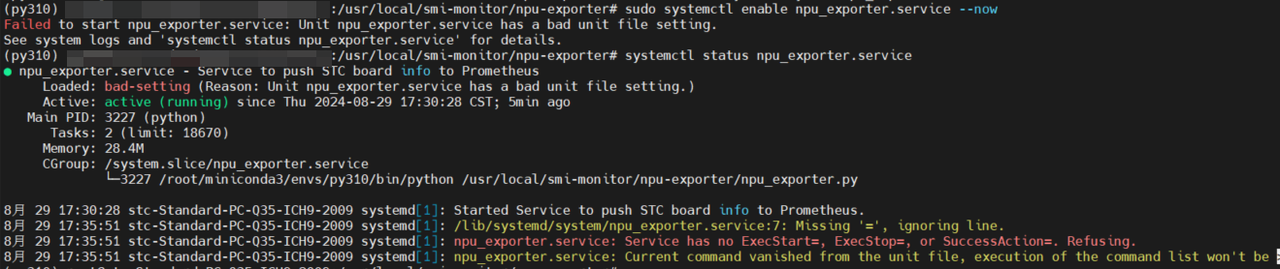
可先使用systemctl status npu_exporter.service查看详情,如出现图中错误,可检查一下/usr/lib/systemd/system/npu_exporter.service服务配置文件中的路径。